
Event Log Query Initiate Simple
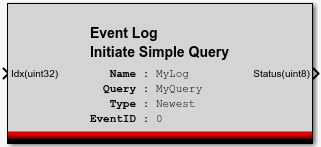
This MotoHawk™ block is part of the Logging Blockset and allows a query to be initiated. It is a masked subsystem that wraps the Query Initiate block with some dropdowns that simplify the query.
Block ID
Event Log Query Initiate Simple
Library
motohawk_logging_lib
Description
Input Ports
Idx (uint32)
The index port is a zero based index that can be used to initiate a query part way through the referenced Event Log. For instance, supplying a value of 2 would initiate a query that would return the 3rd newest (assuming the initiated Query was to start from the newest event.
Output Ports
Status (uint8)
A status of [0](Log - Busy) indicates that the query is still underway. Try again later.
A staus of [1](Log - OK) indicates that the query was scheduled to occur.
A status of two or more indicates that the query was not scheduled because of an error. The value indicates the type of error.
A common error would be [6]](Log - Q Overflow) that results when the Event Log is unable to support further parallel queries. An existing query first needs to be freed in order to free up a query slot.
Block Parameters
| Parameter Field | Values | Comments/Description |
|---|---|---|
| Reference Event Log Name | Single quote enclosed c-legal alpha-numeric text |
The name of the Event Log definition block that is to be queried. |
| Query Name | Single quote enclosed c-legal alpha-numeric text |
The name to be assigned to the query. Other query operations like Event Log Query Next, Event Log Query Result, and Event Log Query End reference this name. |
| Query Type | Dropdown | A query that starts from the newest entry and queries back in time or starts from the oldest event and queries forward in time. The EventIF suffix indicates the query is only to return EventIDs that match the supplied value. |